

Linux Distribution: Your Computer's Secret Recipe!
Images
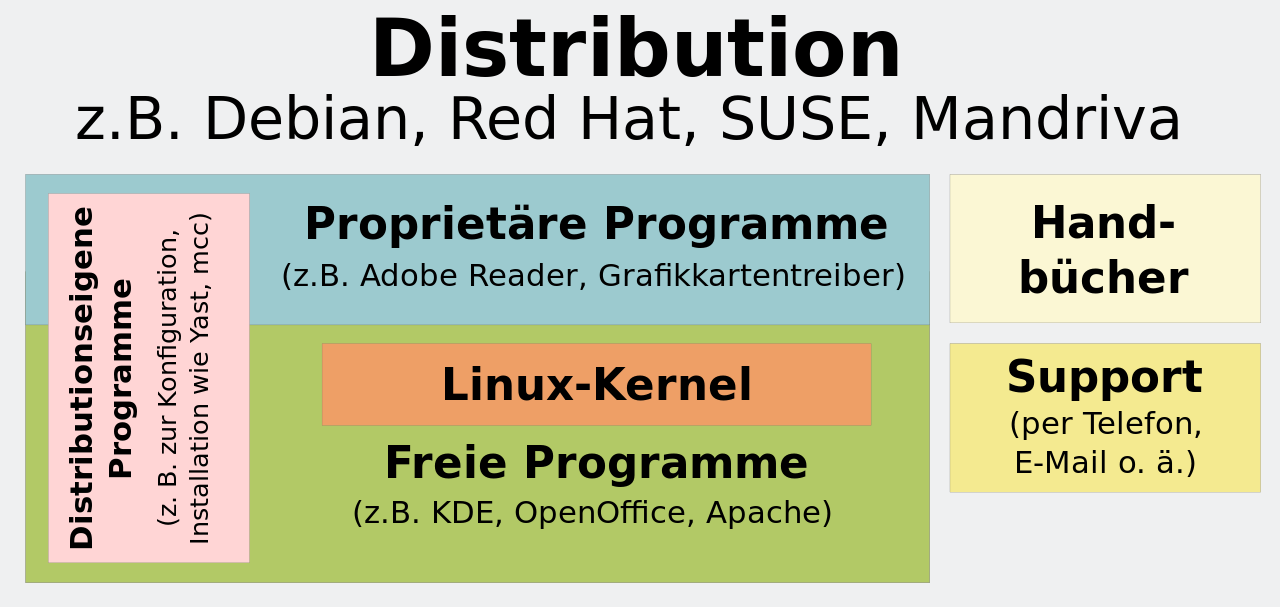
Linux-Distribution


The Modular Foundation
A Linux distribution is far more than just the Linux kernel; it's a meticulously assembled ecosystem of software designed to provide a complete, functional operating system. The kernel, the heart of the system, manages hardware resources, process scheduling, and memory. However, to create a usable environment, distributions integrate a vast array of components.
Crucially, these include GNU utilities and libraries, which provide essential command-line tools and programming interfaces. Beyond these foundational elements, distributions offer choices for the user interface. This can range from lightweight window managers to full-fledged desktop environments like GNOME, KDE Plasma, or Xfce, each offering a distinct user experience and visual paradigm.
The inclusion of a display server (like X.org or Wayland) and a sound server (like PulseAudio or PipeWire) further enables rich multimedia and graphical capabilities, transforming the raw kernel into an interactive platform.
Evolutionary Pathways
The concept of a Linux distribution emerged from the necessity to package the Linux kernel with other essential software, primarily from the GNU Project, to create a bootable and usable operating system. Early efforts involved manual compilation and integration, a process that was complex and time-consuming. As Linux gained popularity, developers began creating standardized ways to bundle these components, leading to the first distributions like SLS (Softlanding Linux System) and eventually more enduring ones such as Slackware and Debian.
This evolution was driven by a desire to simplify installation and management, making Linux accessible to a broader audience. Over decades, this has led to an incredible diversification, with distributions optimized for everything from high-performance computing clusters to resource-constrained embedded devices, each representing a unique philosophy on software selection, configuration, and community governance.
The Strategic Significance
The strategic importance of Linux distributions lies in their unparalleled flexibility, adherence to open-source principles, and resulting ubiquity. Unlike proprietary operating systems, distributions offer users a profound degree of control and customization. This adaptability allows them to be deployed across an astonishing spectrum of hardware and use cases, from the servers powering the internet and cloud infrastructure to mobile devices (via Android), automotive systems, and the world's most powerful supercomputers.
The open-source nature of most distribution software fosters transparency, security through community review, and rapid innovation. Furthermore, the existence of both commercially supported distributions (like Red Hat Enterprise Linux, SUSE) and entirely community-driven projects (like Arch Linux, Gentoo) provides a robust ecosystem catering to diverse needs, from enterprise-grade stability and support to bleeding-edge customization and learning.
The Mechanics of Distribution
The operational backbone of a Linux distribution is its package management system. This sophisticated infrastructure automates the complex task of software deployment, ensuring that applications and their dependencies are installed, updated, and removed efficiently and reliably. Systems like APT (used by Debian and Ubuntu) or DNF (used by Fedora and RHEL) abstract away the intricacies of compiling, linking, and configuring software.
These package managers interact with 'repositories,' which are distributed servers hosting vast collections of pre-compiled software packages. The process typically involves downloading binary packages for convenience, though some distributions, like Gentoo, emphasize compiling from source code, allowing for deep system optimization tailored to specific hardware. This robust system is fundamental to maintaining system integrity and facilitating user access to a wide software selection.
A Spectrum of Distributions
The Linux ecosystem is characterized by an immense diversity of distributions, each catering to distinct user needs and technical philosophies. User-friendly distributions such as Ubuntu, Linux Mint, and Fedora prioritize ease of installation and a polished desktop experience, making them ideal for newcomers. For servers and enterprise environments, Red Hat Enterprise Linux and SUSE Linux Enterprise Server offer long-term support, stability, and commercial backing.
At the more advanced end, distributions like Arch Linux and Gentoo provide users with granular control, often requiring compilation from source code and manual configuration, appealing to those who seek maximum customization and a deep understanding of their system. Specialized distributions also exist for specific purposes, such as security testing (Kali Linux) or embedded systems (OpenWrt), demonstrating the remarkable adaptability and reach of the Linux architecture.
Go deeper
Frequently Asked Questions
What is a Linux distribution?+
Why do Linux distributions have different user interfaces like GNOME or KDE?+
How do Linux distributions help people who want to use computers for different jobs?+
What is a package manager in a Linux distribution?+
Are Linux distributions free to use?+
Based on content from Wikipedia · Licensed under CC BY-SA 4.0