

Microsoft Windows
Images

Information Security Wordle: NIST Guide To Securing Microsoft Windows XP Systems For IT Professionals (Draft)




The Genesis of Windows
Microsoft Windows emerged not as a standalone operating system, but as a graphical operating system shell for MS-DOS. Its inception in November 1985 was a direct response to the burgeoning interest in Graphical User Interfaces (GUIs), pioneered by companies like Xerox PARC and popularized by Apple's Macintosh. Windows 1.0 aimed to bring the intuitive, visual paradigm of GUIs to the IBM PC compatible market, which was largely dominated by the text-based MS-DOS.
This strategic move allowed Microsoft to leverage the widespread adoption of MS-DOS while offering a more user-friendly experience. The very name 'Windows' aptly described its core innovation: a windowing system that allowed multiple applications to run concurrently and be displayed simultaneously on the screen, a significant departure from the single-tasking nature of MS-DOS. This foundational concept laid the groundwork for the modern multitasking computing experience.
Evolution and Diversification
The trajectory of Windows saw significant acceleration with the release of Windows 3.0 in 1990, which achieved massive market success and solidified its dominance. Over the decades, Microsoft strategically diversified Windows into distinct families to cater to specific industry sectors. These include Windows for personal computers (the most familiar version), Windows Server for managing networks and data centers, and Windows IoT for embedded systems in devices.
Furthermore, within these families, Windows is segmented into editions tailored for different user needs: Home for general consumers, Professional for power users and small businesses, Education for academic institutions, and Enterprise for large corporations with advanced security and management requirements. This tiered approach allows Microsoft to maximize its reach and provide specialized functionality across a vast spectrum of computing environments.
Dominance and Impact
Microsoft Windows stands as the most prevalent desktop operating system globally, commanding a substantial market share. As of October 2025, it held approximately 72% of the desktop OS market, underscoring its pervasive influence on personal computing. This dominance is not merely a statistical fact; it has profound implications for software development, hardware compatibility, and user accessibility.
The vast majority of desktop applications and games are developed with Windows as a primary target platform, creating a rich software ecosystem. Its widespread adoption means that billions of users worldwide are familiar with its interface and functionality, making it a de facto standard for digital interaction. While mobile operating systems like Android and iOS dominate the smartphone market, Windows remains the undisputed leader in the desktop and laptop realm, continuing to shape how individuals and organizations interact with digital information and services.
Under the Hood
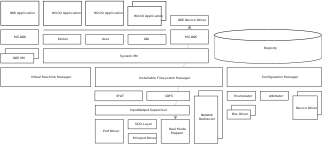
At its heart, Windows functions as a complex operating system responsible for managing a computer's hardware resources and providing a platform for software applications. It orchestrates the Central Processing Unit (CPU), memory, storage devices, and input/output peripherals. The operating system's kernel is the core component, handling fundamental tasks such as process management, memory allocation, and device driver interactions.
The graphical user interface (GUI), with its iconic windows, icons, menus, and pointers, is built upon this kernel, providing an abstract layer that simplifies interaction for the user. Windows employs sophisticated memory management techniques to allow multiple applications to run concurrently without interfering with each other, a process known as multitasking. Furthermore, it provides a robust framework for application development through Application Programming Interfaces (APIs), enabling developers to create sophisticated software that leverages the underlying hardware and system services.
The continuous evolution of Windows, exemplified by versions like Windows 11, focuses on enhancing user experience, security, and performance.
Windows' Enduring Legacy and Future Trajectory
The legacy of Microsoft Windows is intrinsically linked to the democratization of computing. By transforming complex machinery into accessible tools through its intuitive graphical interface, Windows empowered generations of users, from students to professionals. Its adaptability, seen in its various families and editions, has allowed it to remain relevant across diverse technological landscapes, from personal desktops to enterprise servers and the burgeoning Internet of Things (IoT).
While the computing landscape continues to evolve with cloud computing, mobile devices, and artificial intelligence, Windows remains a central pillar. Its future trajectory will likely involve deeper integration with cloud services, enhanced security protocols to combat evolving cyber threats, and continued refinement of its user experience to adapt to new interaction paradigms. The ongoing development of Windows ensures its continued role as a foundational element of the digital world, adapting to meet the challenges and opportunities of tomorrow's technology.
Go deeper
Frequently Asked Questions
What is Microsoft Windows?+
Why did Microsoft make Windows instead of just using MS-DOS?+
How many different versions of Windows are there for different users?+
When did Windows become very popular?+
How many people use Windows on their computers?+
Based on content from Wikipedia · Licensed under CC BY-SA 4.0